Redundant Array of Independent Disks (RAID)
Data Insurance:
A Deep Dive into RAID
In an era where data is the new currency, hardware failure isn’t just an inconvenience it’s a critical vulnerability. Discover how Redundant Array of Independent Disks (RAID) transforms multiple drives into a singular, resilient architecture.
Understanding the Core Architecture
RAID is a data storage virtualization technology that combines multiple physical disk drive components into one or more logical units for the purposes of data redundancy, performance improvement, or both.
Think of RAID as a safety net for your digital assets. By distributing data across multiple disks, we can survive the catastrophic failure of a single drive without losing a single bit of information.
RAID isn’t just about hardware; it’s an algorithmic solution to physical limitations.
The Architectural Standards
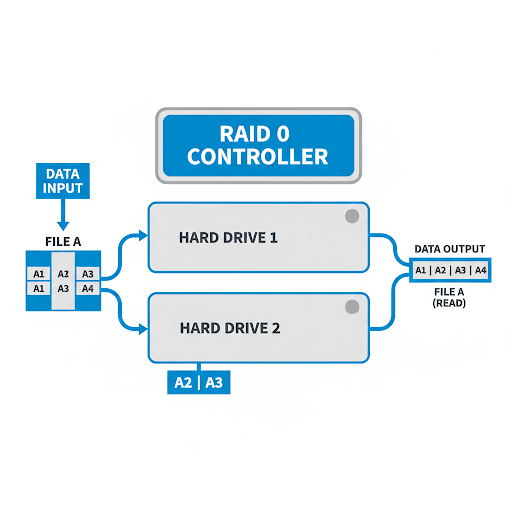
RAID 0: Striping
RAID 0 splits data evenly across two or more disks. Because the computer can write to both disks at once, it’s incredibly fast.
Temporary files, video editing caches, or gaming where speed is king and data loss isn’t a catastrophe.
There is zero redundancy. If one drive fails, all your data is gone.
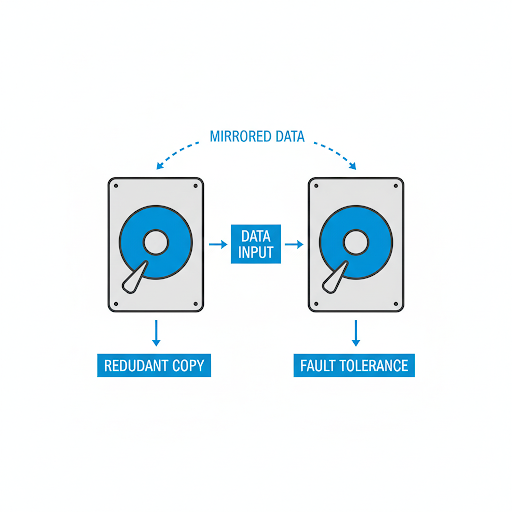
RAID 1: Mirroring
RAID 1 creates an exact clone (or mirror) of your data on two or more disks. If Drive A dies, Drive B steps up without skipping a beat.
Small servers, accounting data, and anyone who wants “set it and forget it” peace of mind.
You lose 50% of your total capacity. If you buy two 4TB drives, you only get 4TB of usable space.
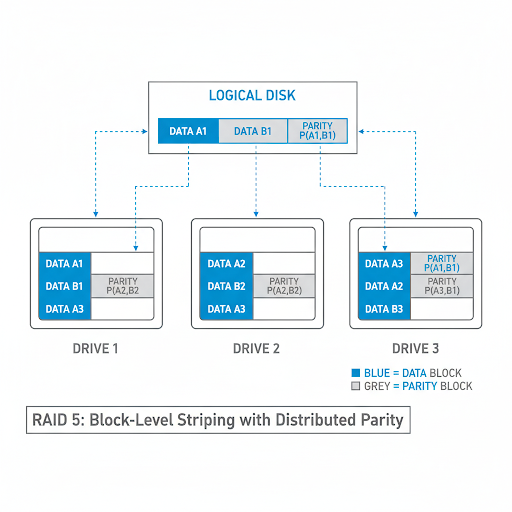
RAID 5: Parity
This is the most popular choice for business servers and NAS (Network Attached Storage) devices. It requires at least three drives. It stripes data across all drives but includes “parity” (mathematical checksums) that allow the system to rebuild data if one drive fails.
File servers and general storage where you need a mix of speed, safety, and high capacity.
If two drives fail at the same time, you lose everything. Also, write speeds are slightly slower due to the parity calculations.
RAID 10: Hybrid
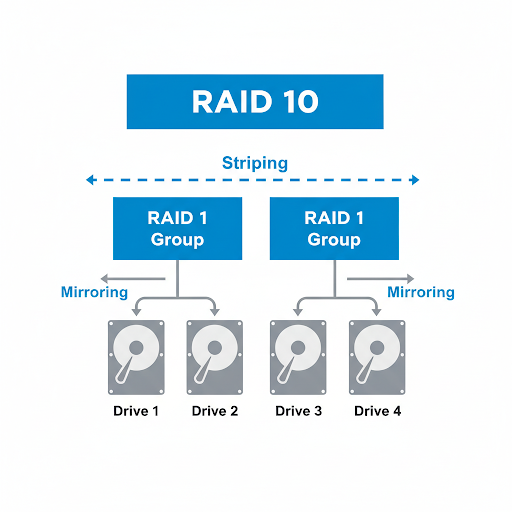
RAID 10 is a “nested” RAID level. It mirrors the data first (RAID 1) and then stripes it (RAID 0). You get the breakneck speed of striping with the ultimate security of mirroring.
Heavy-duty database servers and high-performance applications.
It’s expensive. You need at least four drives, and you can only use half of their total capacity.
Which One is Right for You?
| Level | Min Disks | Fault Tolerance | Read Speed | Write Speed |
|---|---|---|---|---|
| RAID 0 | 2 | Zero | Extreme | Extreme |
| RAID 1 | 2 | 1 Drive | High | Normal |
| RAID 5 | 3 | 1 Drive | Very High | Normal (Parity) |
| RAID 10 | 4 | 1 Drive per Mirror | Extreme | High |
RAID is NOT a Backup
This is the most critical technical misconception in storage. RAID protects against hardware failure, not against data corruption, accidental deletion, or ransomware. If you delete a file in a RAID 1 mirror, it is deleted on both disks simultaneously.
Always maintain an independent off-site backup.