SEO Analyze Extension
 SEO Analyze Extension
The fast on-page SEO analyzer for Google Chrome.
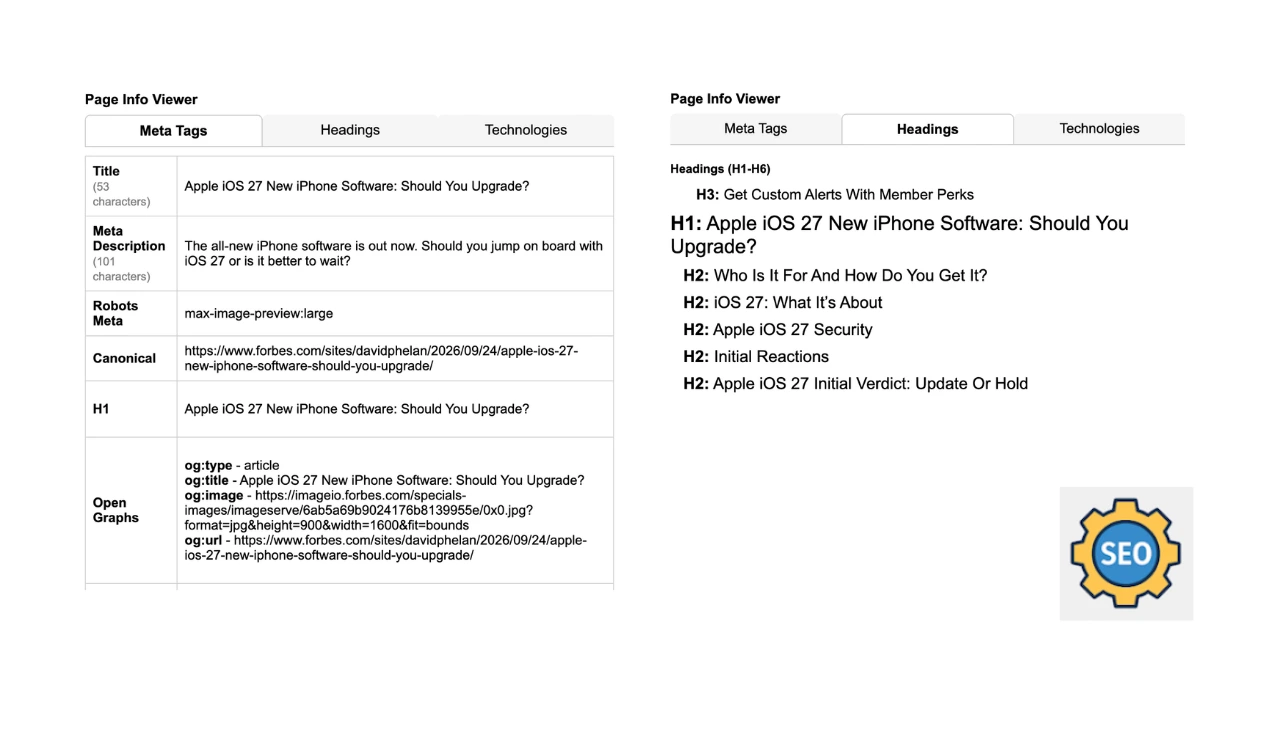
Inspect title tags, meta descriptions, heading structures (H1–H6), missing image alt text, links, and Open Graph social cards in one click.
Extension Preview
Official Chrome Web Store interface showing on-page diagnostic features.

Overview & Metadata Diagnostics
Active ModuleAudits title tag character & pixel width bounds, meta descriptions, canonical URLs, and indexability robots directives in real time.
Everything you need for rapid on-page audits.
No complex dashboards or subscription fees. Simple, fast checks right from Chrome.
Title & Meta Diagnostics
Pixel-accurate SERP truncation meters for titles and meta descriptions. Instant check for canonical URLs and robots indexability directives.
Heading Hierarchy Tree
Complete visual outline of H1 through H6 tags. Immediately flags duplicate H1 tags, missing headings, or skipped structural levels.
Image Alt Tag Auditor
Filters all page images to catch missing accessibility alt text, oversized dimensions, and modern image formats (WebP/AVIF).
Social & Schema Preview
Preview how your page renders when shared on Twitter/X, LinkedIn, and Facebook. Validates Schema.org JSON-LD structured data on the fly.
How to use SEO Analyze Extension
Start auditing web pages in under 30 seconds.
Install Extension
Add SEO Analyze Extension to Chrome in one click from the official Web Store. No signup or account required.
Open Any Page
Visit any public website, client landing page, blog post, or password-protected staging and localhost URL.
Instant Analysis
Click the extension icon in your Chrome toolbar to view real-time titles, headings, alts, links, and schema.
Frequently Asked Questions
Ready to audit your web pages in one click?
Install the free extension in seconds from the Chrome Web Store.