HTML <main> Tag
The HTML <main> element identifies the dominant, unique content of a webpage or application. It helps browsers, search engines, developers, and assistive technologies understand which part of the page contains the central topic or primary function.
<body>
  <header>
    <h1>My Website</h1>
  </header>

  <nav>
    <a href="/">Home</a>
    <a href="/articles">Articles</a>
  </nav>

  <main>
    <h2>Latest Technology News</h2>
    <p>
      This section contains the primary content of the page.
    </p>
  </main>

  <footer>
    <p>Copyright 2026</p>
  </footer>
</body>
The opening tag is <main>, and the closing tag is </main>.
What Belongs Inside <main>?
The <main> element should contain content that is directly related to the page’s central subject or purpose, such as:
- An article or blog post.
- Product information.
- Search results.
- A news story.
- A dashboard’s primary content.
- Forms or tools when they are the main purpose of the page.
- Headings, paragraphs, images, videos, tables, and articles related to the main topic.
For example, on a technology article page, the article title, introduction, body text, images, examples, and related explanations would normally belong inside <main>.
What Should Not Be Included?
Avoid placing repeated site-wide content inside <main>, including:
- The main navigation menu.
- A site-wide header or logo.
- A sidebar containing general links.
- Copyright information.
- A site-wide footer.
- Repeated advertising or promotional content.
These elements generally belong in <header>, <nav>, <aside>, or <footer> instead.
Important Rules for <main> Tag
Use one visible <main> element
A document should not contain more than one <main> element unless the additional elements have the hidden attribute. In ordinary webpages, use one visible <main> element.
<main>
  <h1>Page title</h1>
  <p>Main page content.</p>
</main>
Do not nest it inside certain elements
<main> should not be placed inside:
<header><footer><nav><aside><article>
It is normally used as a major region directly within <body>.
Correct
<body>
  <header>Website header</header>

  <main>
    <article>
      <h1>Understanding Cloud Computing</h1>
      <p>Article content...</p>
    </article>
  </main>

  <footer>Website footer</footer>
</body>
Incorrect
<article>
  <main>
    <h1>Article title</h1>
  </main>
</article>
An <article> can be placed inside <main>, but <main> should not normally be placed inside an <article>.
Accessibility Benefits
The <main> element creates a main landmark. Screen readers can use landmarks to help users jump quickly to the page’s primary content. This is especially helpful when a page has a large navigation menu, advertising area, or repeated header content.
You can also add an id to create a “Skip to main content” link:
<body>
  <a href="#main-content">Skip to main content</a>

  <header>
    <h1>Example Website</h1>
  </header>

  <nav>
    <a href="/">Home</a>
    <a href="/about">About</a>
  </nav>

  <main id="main-content">
    <h2>Welcome</h2>
    <p>This is the primary content of the page.</p>
  </main>
</body>
When a user activates the link, focus moves to the main content area, allowing them to bypass repeated navigation.
Attributes
The <main> element does not have special attributes of its own. However, it supports standard global attributes, including:
<main id="content" class="page-content">
  ...
</main>
Common global attributes include:
idclassstylehiddendata-*lang
The id attribute is particularly useful for skip links.
<main> versus <div>
A <div> is a generic container with no inherent meaning:
<div class="main-content">
  ...
</div>
The <main> element communicates a specific meaning:
<main>
  ...
</main>
Using <main> makes the document structure clearer and improves accessibility. It is usually preferable to using a <div> for the central content area.
<main> versus <body>
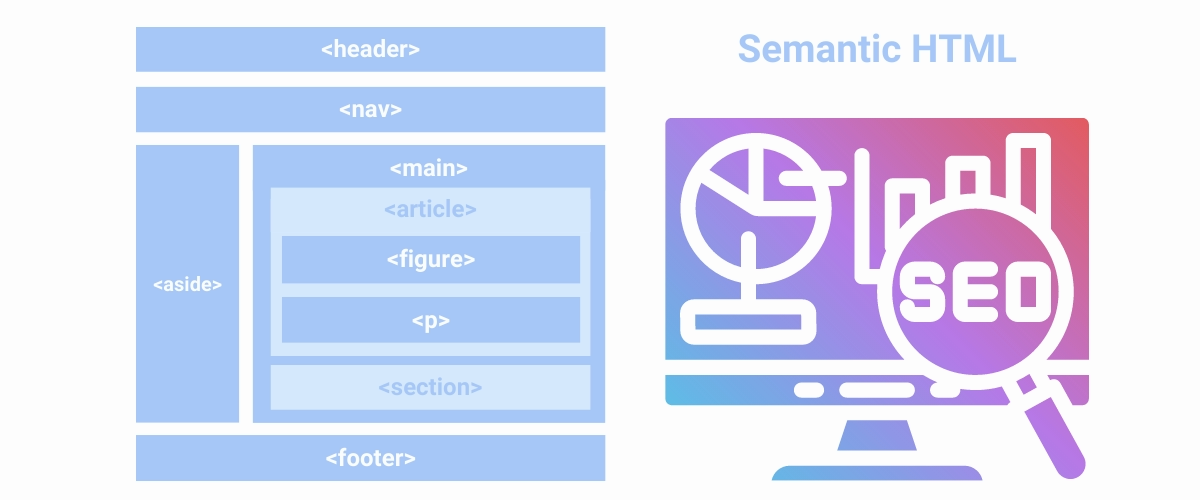
The <body> contains all visible webpage content, including the header, navigation, main content, sidebar, and footer.
The <main> element contains only the central content:
<body>
  <header>Header</header>
  <nav>Navigation</nav>

  <main>
    Main page content
  </main>

  <aside>Sidebar</aside>
  <footer>Footer</footer>
</body>
In short:
<body>: Everything displayed on the page.<main>: The page’s primary and unique content.
SEO Considerations
The <main> element can help search engines and other software understand the page’s structure, but it is not a direct ranking factor by itself. Good SEO still depends on factors such as useful content, clear headings, internal linking, accessibility, performance, and appropriate metadata.
A well-structured article might look like this:
<main>
  <article>
    <h1>What Is the HTML Main Tag?</h1>

    <p>
      The HTML main element identifies the primary content of a webpage.
    </p>

    <h2>Why Is the Main Tag Important?</h2>
    <p>
      It improves semantic structure and helps assistive technologies locate
      the most important content.
    </p>
  </article>
</main>
Key Points for <main> Tag Using
<main>represents the primary content of a webpage.- Its content should be unique to that document or application.
- Use one visible
<main>element per page. - Do not place it inside
<header>,<footer>,<nav>,<aside>,or<article>. - It improves semantic HTML and accessibility.
- It supports global attributes such as id and class.
- It is usually placed directly inside
<body>. - It is preferable to using a generic
<div>for the main content area.